EntityHealth Component
With Astra Health, the new EntityHealth MonoBehaviour allows you to add health points to an entity. In this way, the entity can take damage and, consequently, die.
Here is an example of the EntityHealth component:
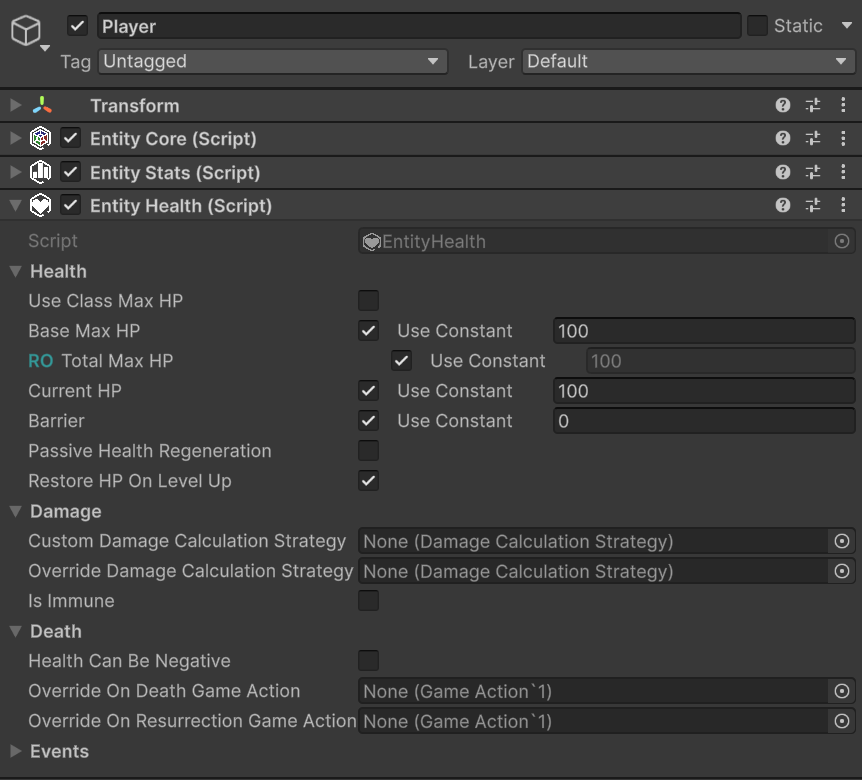
The events section is collapsed by default since there are many events, and it is more practical to expand it only when necessary.
Note
Automatic time-based regeneration is handled by the dedicated EntityPassiveHpRegeneration MonoBehaviour, which you attach alongside EntityHealth on entities that should regenerate over time. See Passive Health Regeneration for setup details.
Let's proceed in order and analyze every property of the EntityHealth component.
Health
- Use Class Max HP: Boolean indicating whether to use the max health points defined in the entity's class as the base max health. If disabled, you can manually specify the base max health for the entity.
- Base Max HP: LongRef representing the base max health of the entity. If "Use Class Max HP" is enabled, this value is marked with teal RO (Read Only). Read Only, for LongRef fields, makes
constvalues non-editable, and suggests not manually modifying values contained by the associated LongVar variable, if aconstvalue is not used. - Total Max HP: LongRef representing the total max health of the entity, calculated based on the base max health and any modifiers. This field is always read-only (RO) and is automatically updated when base max health or modifiers change.
- Current HP: LongRef representing the entity's current health points. Editable field that is automatically updated when the entity takes damage or is healed. This field is also updated if
Base Max HPis modified from the inspector.
Note
If Current HP drops to 0, modifying Base Max HP will not update Current HP. This is intended behavior, as if an entity is dead, it makes no sense for its health points to be modified by a change in max health. If instead the entity is alive, modifying Base Max HP will update Current HP accordingly even if Current HP is currently 0.
This can happen if, for example, you change from 10 base max HP to 25 by deleting the text box with backspace: 10 (backspace) -> 1 (backspace) -> 0 (2 pressed) -> 2 (5 pressed) -> 25. Note that by deleting all numbers and leaving the box empty, Base Max HP becomes 0, and consequently Current HP also becomes 0. At this point, the entity is considered dead.
- Barrier: LongRef representing any barrier points (or temporary HP) of the entity. The barrier absorbs damage before it affects the entity's health points.
- Restore HP On Level Up: Boolean indicating whether the entity is fully healed when leveling up.
Damage
For a better understanding of the first two properties of this section, I recommend taking a look at the Damage Calculation Strategy documentation. Simply put, a Damage Calculation Strategy defines how the damage an entity is about to take is calculated (e.g., applying damage mitigation for the defensive stat first, or damage absorption by the barrier first, when to apply the critical multiplier, etc.). Also recall that a default strategy can be assigned via configuration. See Default Damage Calculation Strategy.
- Custom Damage Calculation Strategy: Field of type
DamageCalculationStrategy. If the entity should use a custom damage calculation strategy, you can specify it here. This, if defined, takes precedence over the default one defined via configuration. A common use case could be, for example, a boss that cannot take more than 10% of its max health in damage at a time. - Override Damage Calculation Strategy: Field of type
DamageCalculationStrategy. If defined, it takes precedence over all other damage calculation strategies. Designed to be assigned at runtime to implement special effects or for testing/debug. For example, an entity is affected by a debuff that turns all physical damage into guaranteed critical hits. This debuff could therefore be implemented through a custom strategy assigned to the entity in this field. - Is Immune: Boolean indicating whether the entity is immune to all damage or not. If enabled, the entity will take no damage, regardless of the damage calculation strategy used.
Death
- Health Can Be Negative: Boolean indicating whether the entity's health points can drop below 0 before dying. If disabled, the entity's health points will never drop below 0, and the entity will die as soon as its health points reach 0. If enabled, the entity's health points can drop below 0, and the entity will die only when its health points reach a specified negative value (Death Threshold).
- Death Threshold: LongRef representing the entity's death threshold. Visible only if "Health Can Be Negative" is enabled. If the entity's health points reach this threshold, the entity dies.
- Override On Death Game Action: Game Action that is automatically executed when the entity dies. If defined, this takes precedence over the one defined in the configuration. Useful for implementing special behaviors upon an entity's death (for example, entities that explode upon death dealing area damage).
- Override On Resurrection Game Action: Game Action that is automatically executed when the entity is resurrected. If defined, this takes precedence over the one defined in the configuration. Useful for implementing special behaviors upon an entity's resurrection.
Damage vs RemoveHealth and Heal vs AddHealth
EntityHealth provides a couple of public methods to increase current HP and two to decrease them:
HealandAddHealthto increase current HP.TakeDamageandRemoveHealthto decrease current HP.
TakeDamage and Heal are extensively documented in the Dealing Damage to an Entity and Healing an Entity sections respectively. However, this sounds like a good moment to introduce the difference between these two pairs of methods, and when to use one or the other.
It is important to clarify why two different methods exist to increase and decrease current HP, and when to use one or the other.
AddHealth and RemoveHealth operate at a lower level of abstraction than Heal and Damage, as they directly modify the entity's current HP by a specified long value, without passing through the damage calculation pipeline or without taking into account any healing or damage modifiers. They are very predictable and direct methods, and are mainly used internally by the framework.
These methods can be useful in specific situations where the gain of HP is not due to healing, or the loss of HP is not due to damage, but rather to particular mechanics that require a direct modification of current HP. For example, suppose that following a cutscene we want to force the player's HP to 1. In this case, we could use RemoveHealth to remove all HP except 1, without having to worry about any damage modifiers or the damage calculation strategy that would alter the damage taken based on the player's stats and equipment, as well as raising damage events that could trigger game logic we don't want to activate in this specific case.
Heal and TakeDamage, on the other hand, are more complex methods that take into account various factors such as the damage calculation strategy, damage immunity, healing modifiers, etc. These methods are intended to be used primarily by game developers to apply damage and healing to entities, as they guarantee that all mechanics and rules of the health system are respected. For example, if you want to inflict damage on an entity, it is advisable to use the TakeDamage method, so that the damage is calculated correctly based on the configured damage calculation strategy, and that any immunities or modifiers are taken into consideration.
Unsurprisingly, Heal and TakeDamage internally use AddHealth and RemoveHealth to effectively modify the entity's current HP after calculating the net HP gain or loss to apply.
In 99% of cases, you will use Heal and TakeDamage to apply healing and damage to entities. AddHealth and RemoveHealth are available to cover rarer and more particular use cases.
Events
Events are, by default, collapsed as there are many of them and they would expand excessively in the inspector. By opening them, we should see something like this:
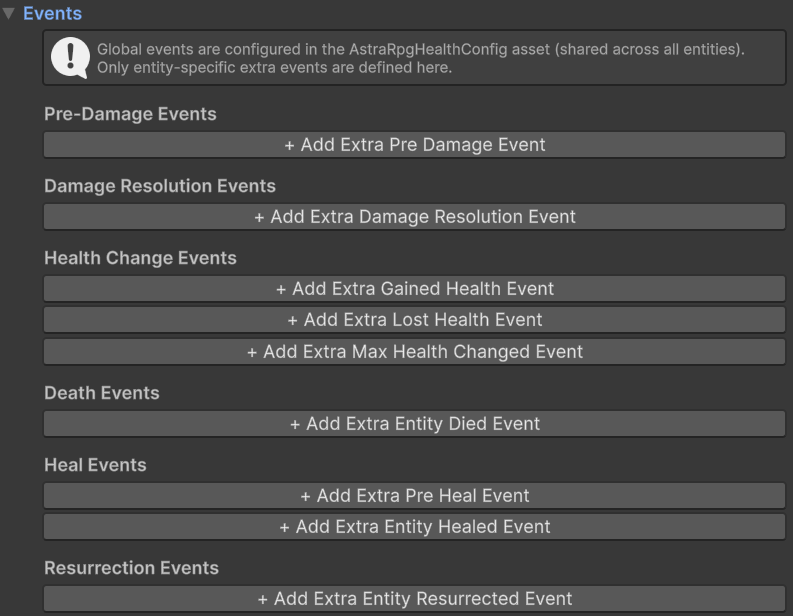
In the image, you don't see any assigned event. Therefore, this is the view of the inspector you should get when you freshly add the EntityHealth component to an entity.
Through EntityHealth we can configure entity-scoped Event Channels. For each signal (e.g., Pre Damage Info Event, Entity Died Event, etc.), the corresponding Event Channel is the per-entity mechanism that orchestrates the raise flow.
Global Events
Global Events broadcast health-related information to the entire game and are configured once at the project level in the AstraHealthConfigSO asset — not per entity on EntityHealth. This guarantees a single authoritative source for framework-level communication and eliminates the risk of misconfiguration caused by different entities referencing different event assets.
The framework uses several global events internally: for example, the Damage Resolution event powers lifesteal, and the Entity Died event is what experience collectors listen to for XP awards. See Global Events in Package Configuration for the full reference, including which events are required and which framework features depend on each.
Event Channels
Event Channels are assigned directly on the EntityHealth component. They are designed to bridge the package-level global communication with optional per-entity communication.
Each Event Channel contains:
- a resolver that retrieves the corresponding Global Event from
AstraHealthConfigSO - a list of Extra Events that you can assign directly on that specific entity
When the relevant action occurs (e.g., the entity takes damage, the entity dies, etc.), EntityHealth raises the corresponding Event Channel. The channel then raises the resolved Global Event configured at package level, if any, and, in the same flow, all Extra Events assigned to that channel.
Extra Events are therefore not an alternative to Event Channels: they are the entity-specific events stored inside them. A practical example is the communication between the player's EntityHealth and the HUD displaying their HP: only the player possesses a dedicated HUD, so it is useful to assign an exclusive extra event on the appropriate channel for this interaction. In this way, the HUD does not receive events from all entities, but only those relevant to the player, while the global event is still available for game-wide systems.
EntityHealth implements IEventRegistrar, which provides Subscribe<TEvent> and Unsubscribe<TEvent> for adding and removing extra events at runtime:
// Register a per-entity listener at runtime
entityHealth.Subscribe<EntityDiedGameEvent>(myEntitySpecificDeathEvent);

// Unregister it
entityHealth.Unsubscribe<EntityDiedGameEvent>(myEntitySpecificDeathEvent);
Replace EntityDiedGameEvent with the concrete event type for the channel you want to target (e.g., PreDamageGameEvent, DamageResolutionGameEvent, EntityHealthChangedGameEvent, HealthRatioChangedGameEvent, etc.).
Events Breakdown
Here is a detailed description of each event. Each signal has a corresponding Event Channel on EntityHealth; that channel raises the global event configured in AstraHealthConfigSO and any extra events assigned to the entity, so it is sufficient to describe each signal once.
Damage Related Events
To better understand the first two events of this section, I recommend taking a look at the Damage documentation to get a better understanding of damage in Astra Health.
- Pre Damage Info Event: Event raised before the entity takes damage, and before the damage calculation pipeline calculates the net damage. This event transmits information about the damage the entity is about to take, such as the damage type, the damage source (an entity,
nullif not applicable), the damage source type (e.g., environmental, skill, trap, etc.), the raw damage you intend to inflict, and other relevant information. For more details regarding the context parameter and its fields, refer to the API documentation PreDamageContext. This event can be useful for implementing passive abilities or, in general, advanced mechanics that trigger effects in response to specific conditions related to the damage an entity is about to take. For example, a debuff or status modifier that amplifies critical damage taken by 50% when the damage type is "Fire", or a passive ability that negates all instances of damage currently being taken if they had raw damage less than 50. - Damage Resolution Event: Event raised after the entity has taken or ignored damage. Similarly to the context parameter of the previous event, this event transmits detailed information about the damage just taken or ignored. For more details regarding the context parameter and its fields, refer to the API documentation DamageResolutionContext.
In general, the thumb rule for deciding whether to use the Pre Damage Info Event or the Damage Resolution Event is the following: if you want to manipulate the damage an entity is about to take, it is better to subscribe to Pre Damage Info Event, and modify the context as desired; if instead you want to react to the damage an entity has just taken, and trigger effects in response to it, it is better to subscribe to Damage Resolution Event, and react based on the information transmitted by its context.
Health Related Events
- Health Changed Event: Event raised whenever the entity's current HP changes, whether the value increases or decreases. This includes healing, damage, resurrection, and other mechanics that directly modify current HP such as
AddHealth,RemoveHealth, or max-HP-driven HP adjustments. Refer to the EntityHealthChangedContext API for more details on the context parameter.
Note
Because TakeDamage and Heal internally invoke RemoveHealth and AddHealth, calling these methods will also raise the EntityHealthChanged event.
- Max Health Changed Event: Event raised when an entity's total max health points change. This event is raised both when total max hp increase and when they decrease. See EntityMaxHealthChangedContext API for more details on the context parameter.
- Health Ratio Changed Event: Event raised whenever the HP/MaxHP ratio changes — whether because current HP changed (via
AddHealth/RemoveHealth) or because MaxHP changed (viaRecalculateMaxHp). CarriesHealthRatioChangedContextwith rawPreviousHp,NewHp,PreviousMaxHp, andNewMaxHpvalues, plusPreviousValueandNewValueas integer HP percentages (0–100). Useful for HP-ratio-based conditions — for example, triggering an ability when an entity drops below 25% HP. See HealthRatioChangedContext API for more details on the context parameter. - Entity Died Event: Event raised when the entity dies. See EntityDiedContext API for more details on the context parameter. For owned entities,
EntityDiedContext.Performeris resolved from the damage performer through the Kill Credit Attribution field — see Attribution.
Healing Related Events
- Pre Heal Event: Event raised before the entity is healed. This event transmits information about the healing the entity is about to receive, such as the amount of HP you intend to heal, the entity that provided the healing (
nullif not applicable), the heal source (e.g., skill, item, potion, etc.) and other relevant information. For more details regarding the context parameter and its fields, refer to the API documentation PreHealContext. The amount of health points intended to heal, transmitted by this event, is the value before applying any healing modifiers. This event can be useful for implementing passive abilities or, in general, advanced mechanics that trigger effects in response to specific conditions related to the healing an entity is about to receive. For example, a buff that amplifies healing derived from potions (heal source) by 30%. - Entity Healed Event: Event raised when the entity has been healed. This event transmits information about the healing just received, such as the amount of HP the entity actually gained after the application of any healing modifiers. For more on the context parameter see the ReceivedHealContext API.
Here too, as for damage events, the thumb rule for deciding whether to use the Pre Heal Event or the Entity Healed Event is the following: if you want to manipulate the healing an entity is about to receive, it is better to subscribe to Pre Heal Event, and modify the context as desired; if instead you want to react to the healing an entity has just received, and trigger effects in response to it, it is better to subscribe to Entity Healed Event, and react based on the information transmitted by its context.
Resurrection Related Events
- Entity Resurrected Event: Event raised when the entity is resurrected. See ResurrectionContext API for more details on the context parameter.